From Firmware to Field: The Complete OTA Update Journey
Featured Blogs
From Firmware to Field: The Complete OTA Update Journey
Over-the-Air (OTA) updates have become an essential part of modern IoT ecosystems. As connected devices are often deployed in remote or large-scale environments, physically updating firmware is time-consuming, expensive, and sometimes impossible. OTA technology enables manufacturers to remotely update firmware, security patches, configurations, and device features without requiring physical access to the device. From smart home products and industrial automation systems to healthcare wearables and agricultural sensors, OTA updates help maintain device performance, security, and long-term reliability.
Categories
- All
- IoT Security & Device Commissioning
- Embedded OTA Solutions
- Low-Power Embedded Systems
- Cellular IoT
- IoT Dashboard Solutions
- Machine Vision
- Healthcare IoT
- Smart Mining
- IoT-powered smart parking
- Clean Tech & Sustainability
- Predictive Maintenance
- LoRaWAN Security
- Automotive
- IoT Device Management
- SecureIoT
- SecureByDesign
- IoT Technology / Smart Systems
- Wearable Technology
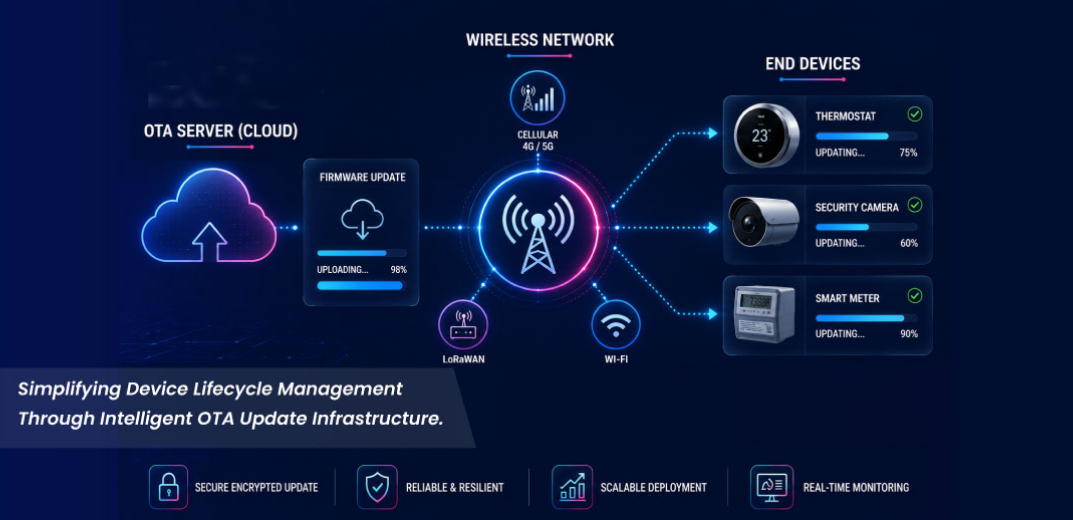
From Firmware to Field: The Complete OTA Update Journey
What is OTA Update in IoT?
OTA (Over-the-Air) update is a remote firmware or software upgrade process where new updates are delivered to IoT devices through wireless communication networks such as Wi-Fi, Cellular, or LPWAN technologies.
OTA updates may include:
- Firmware version upgrades
- Bug fixes
- Feature enhancements
- Configuration changes
- Performance optimization
Why Are OTA Updates Important ?
- Security Improvements: OTA updates help patch vulnerabilities and protect devices from cyber threats.
- Remote Maintenance: Devices deployed in remote areas can be updated without onsite service visits.
- Feature Expansion: New functionalities can be added even after product deployment.
- Bug Fixing: Critical software issues can be resolved quickly across all deployed devices.
- Cost Reduction: Remote updates reduce operational and maintenance expenses significantly.
- Product Lifecycle Management: OTA enables long-term device support and continuous performance improvements.
Challenges in OTA Updates

OTA Update Workflow in IoT

Step : 1 Firmware Preparation & Validation
- The OTA process begins with preparing the new firmware version. The firmware is tested, validated, and checked for stability, compatibility, and security before deployment to ensure reliable device performance.
- The generated firmware binary (.bin) also includes CRC data appended at the end of the file for integrity verification during the update process.
- Firmware optimization and testing under different scenarios are also performed before release.
- Once validated, the firmware package is uploaded to the cloud platform. The firmware is made accessible through secure HTTPS/HTTP URLs for remote device access.
- The cloud server acts as the central distribution point for firmware management, version control, and update delivery.
- The device receives an OTA notification either automatically from the cloud or manually through an application/dashboard trigger.
- A downlink request is sent to the end device containing the latest firmware version information. The device compares the received firmware version with its currently running version.
- If the received version is newer or greater than, the OTA process begins, and the firmware package starts downloading in chunks for better reliability and memory management.
Step 4: Secure Firmware Download
- The device securely downloads the firmware package in chunks using encrypted communication protocols such as HTTPS or TLS to prevent unauthorized access or data tampering during transmission.
- Once the firmware package has been successfully downloaded and verified, it is stored in the designated flash memory region without affecting the currently running firmware.
- Depending on the device architecture, the firmware may be stored in either internal flash memory or external flash memory.

- In devices with sufficient internal flash memory, the bootloader uses a dual-partition (A/B) architecture. The currently running firmware remains active in one partition while the new firmware is downloaded into the inactive partition.
- After successful validation, the bootloader switches execution to the updated firmware during reboot. If the update fails, the device can automatically roll back to the previous working firmware, ensuring safe and reliable OTA updates.

- In memory-constrained devices, the new firmware is downloaded and stored in external flash memory instead of internal application memory.
- After the firmware is fully downloaded and validated, the bootloader copies the verified image into the internal application region and activates it during the next reboot.
- This approach allows OTA updates even when internal flash memory is insufficient for dual-bank firmware storage.
- After the firmware download is completed, the device performs CRC (Cyclic Redundancy Check) or checksum verification to ensure the firmware file is not corrupted during transmission.
- The device may also verify firmware authenticity using digital signatures or certificates before installation to ensure the firmware originates from a trusted source.
Step 7: Device Reboot
- After all firmware chunks have been successfully downloaded and stored in the designated flash memory region, the OTA update flag is set to indicate that a new firmware image is ready for activation.
- The device then performs a controlled reboot.
- During startup, execution is transferred to the bootloader, which initiates the firmware validation process and determines whether the newly downloaded firmware should be activated or the existing firmware should continue running.
- Bootloader is responsible for controlling and managing the complete firmware upgrade operation.
- When sufficient internal flash memory is available and the firmware size is relatively small, the bootloader can use an internal dual-bank architecture for OTA updates.
- For larger firmware images or memory-constrained devices, external flash memory is commonly used to store and manage the firmware update process.

- The device powers up or undergoes a system reset. Control is first transferred to the bootloader before the main application firmware is executed.
- The bootloader initializes essential hardware resources, memory interfaces, and boot configurations. It prepares the system for firmware validation and determines the appropriate boot sequence.
- The bootloader checks for an OTA update flag, pending firmware image, or firmware activation request stored in flash memory. If no update is detected, the bootloader proceeds with the currently active firmware.
- The bootloader validates the firmware image by performing integrity and authenticity checks such as CRC verification, checksum validation, digital signature verification, or cryptographic hash validation. This ensures that only trusted and uncorrupted firmware is executed.
- Based on the validation results, the bootloader selects the firmware image to boot.
- In dual-bank architectures, this may involve choosing between the existing firmware image and the newly updated firmware image stored in the alternate memory bank.
- In external flash-based OTA systems, the bootloader copies the validated firmware from external flash to internal application memory before activating it.
- After successful validation and image selection, the bootloader transfers execution control to the selected application firmware by jumping to its reset vector and application entry point.
- The application firmware starts executing normally, initializing system peripherals, communication interfaces, and application-specific functions. The device then resumes its intended operation using the selected firmware image.
Step 9: Updated Firmware
- If the reboot and validation process are successful, the device starts operating with the updated firmware and newly added features, improvement.
- No matter how well you test, failures can happen - power loss, network drop, or corrupted downloads.
- If the update process fails or the device detects abnormal behavior after reboot, the system automatically rolls back to the previous stable firmware version to maintain device reliability and prevent downtime.
- A rollback mechanism ensures the device can safely return to the previous working version if the update fails.
- In simple terms: “If something goes wrong, go back to the last stable state.”
- This is one of the most important safety nets in OTA design.

OTA updates play a critical role in modern IoT systems by enabling secure and reliable firmware upgrades without physical device access.
From firmware preparation and secure delivery to bootloader validation and rollback recovery, each stage helps ensure device stability, security, and long-term maintainability.
At Dotcom IoT, we develop end-to-end IoT solutions with robust OTA update mechanisms, secure firmware architectures, and scalable device management capabilities, helping businesses deploy connected products that remain secure, up-to-date, and future-ready throughout their lifecycle.
"A reliable OTA framework doesn`t just update devices - it extends product life, enhances security, and enables continuous innovation."
Recent Post
Get In Touch With Us
Are You Ready To Grow Your Business With Us?
Drop us a message
- Dotcom IoT : Headquarter

FC 3011, F Tower, Central Wing, Next to ICICI Bank, Bharat Diamond Bourse, G Block, Bandra Kurla Complex, Bandra East, Mumbai 400051, India - Dotcom IoT : R&D Centre
410/4th Floor, Sunshine Commercial Complex, Hans Society, Mota Varachha, Surat, Gujarat 394101. 
USA
20W 47th ST, Suite#1501-A New York, NY 10036-3735.
South Korea
369, Sangdo-Ro, Venture Center, Soongsil Univ., Dongjak-Gu Seoul, South Korea.- +91 85919 00346

- sales@dotcom.co.in

Tag:
#OTA Updates#Remote Device Updates#Wireless Firmware UpdateShare:
Taksh Patel is a Senior Embedded Firmware Engineer at Dotcom IoT, specializing in low-power IoT devices, embedded systems, and OTA firmware updates using LPWAN technologies. He is passionate about building reliable, scalable, and connected solutions.